
Motion
The standardized motion attribute was introduced to have a universal way of handling device motion for all protocols. Some devices report this attribute directly. For other devices it is automatically calculated based on the speed value and the speedThreshold parameter. It is also possible to override it using computed attributes.
The system analyzes positions and switch motion state according to the configuration. Onemap8 switches state from stopped to moving if a device is reporting motion as true for more than minimalTripDuration seconds or trip distance more than minimalTripDistance meters. Onemap8 switches state from moving to stopped if a device is reporting motion as false for more than minimalParkingDuration seconds or useIgnition enabled and the ignition is off. Only continuous periods can switch the state, any fluctuations reset the detection.
The following parameters can be used to configure the detection logic:
- Name
report.trip.minimalTripDuration- Type
- config
- Description
- Trips of less than minimal duration and minimal distance are ignored. 300 seconds and 500 meters by default.
- Name
report.trip.minimalTripDistance- Type
- config
- Description
- trips of less than minimal duration and minimal distance are ignored. 300 seconds and 500 meters by default.
- Name
report.trip.minimalParkingDuration- Type
- config
- Description
- stops for less than minimal duration does not detected as stop. 300 seconds by default.
- Name
report.trip.minimalNoDataDuration- Type
- config
- Description
- gaps in reported positions longer than the value are considered as stops (only in reports). 3600 second by default.
- Name
report.trip.useIgnition- Type
- config
- Description
- force switch to stop state if ignition is reported and off. Disabled by default.
Trips and Stops
Onemap8 provides two advanced report types called Trips and Stops. It uses the same motion detection algorithm to determine trips and stops for those reports. The stops report can detect gaps between reported positions and treat them as a stop.
Examples
Following are two examples to illustrate how the logic works.
The first example illustrates the most common case of reporting. This can be a device that has an internal battery or connected to an uninterrupted external power supply. It keeps reporting even when the vehicle stops, but it can go into a sleep mode after some period (rows 19 - 21) if there is no movement.
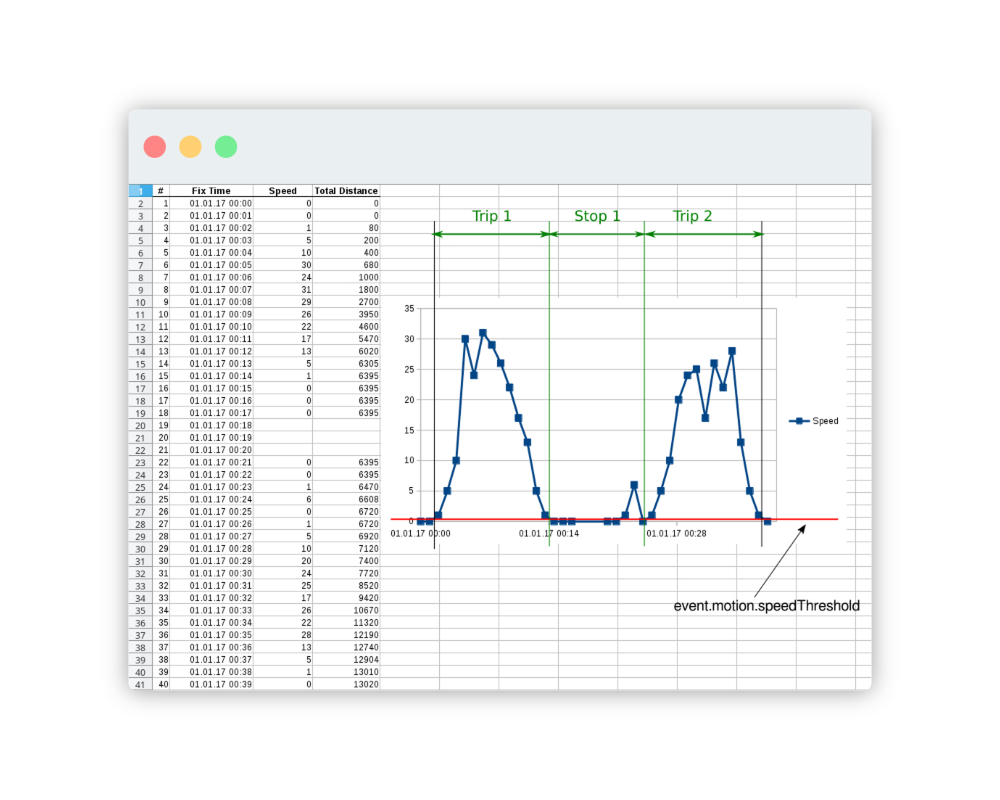
Trip 1 is detected because period started from zero speed (initialized as stopped), distance longer than default 500 meters or duration longer than 5 minutes, and it is followed by stop longer than minimalParkingDuration.
Stop 1 is detected because it has a duration longer than minimalParkingDuration and the speed is close to zero.
Trip 2 is detected from row 27, rows 24 - 25 are ignored as fluctuation. Parameters are more than minimal, and it preceeded and followed by positions with zero speed.
The second example illustrates a case when device does not have an internal battery and powered only when ignition is on. Such devices always cold-start and have a delay in GPS fix. For such devices it is common to start reporting with a speed higher than zero. It is impossible to use same algorithm as in the first example, so additional logic was introduced. Gaps between reporting intervals are detected as stops.
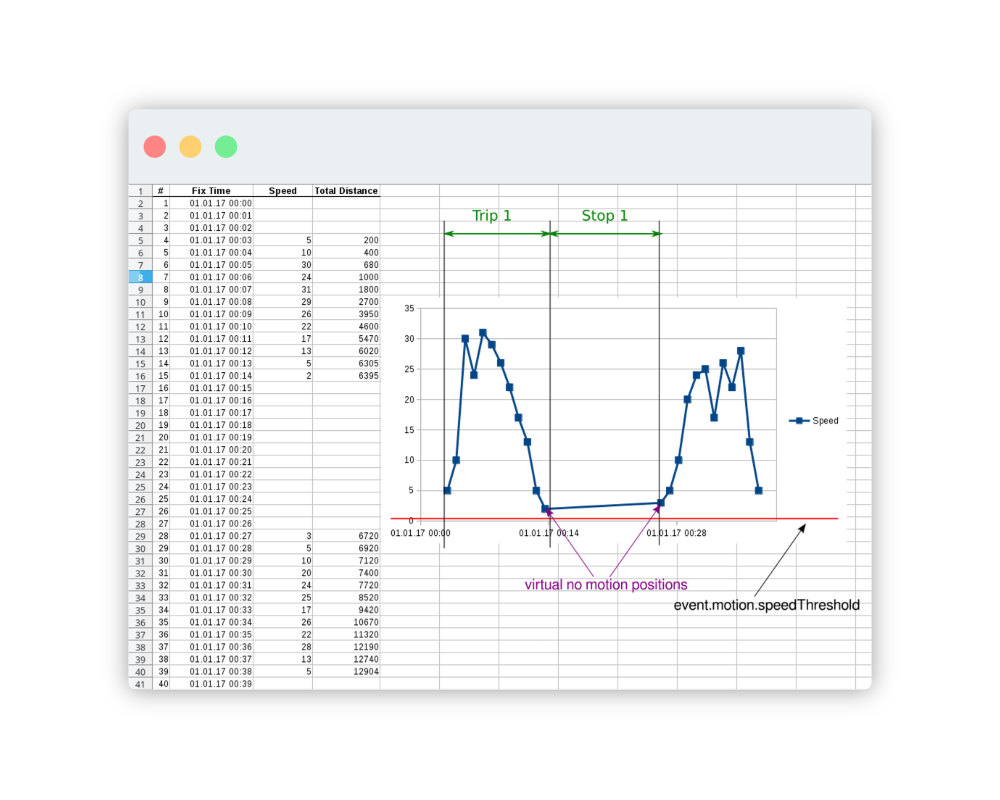
The report.trip.minimalNoDataDuration parameter is set to 600 (10 minutes). You can see that the speed is never less than the speedThreshold, but the gap (rows 15 - 28) is more than 10 minutes. It is interpreted as a stop. Preceding trip is detected correctly. Following movement period is not detected as a trip because the algorithm cannot determine when it ends. Only full stops or trips are recorded.